Three connected workflows across vehicle configuration, dealer delivery and inspection.
Designing three connected workflows for enterprise vehicle operations
Harbinger connects product configuration, dealer delivery and vehicle inspection across an internal HBR Portal and an external Dealer Portal.
- Role
- UI/UX Designer
- Duration
- 2025 to 2026
- Portals
- HBR Portal + Dealer Portal
One vehicle record across configuration, delivery and inspection.
- Contribution
- Workflow structure, high-fidelity UI, states, business-rule clarity, developer handoff, deployed UI review and retrospective UX documentation
- Focus
- Roles, business rules, states, workflows and UI delivery
- Scope boundary
- Backend rules, production data, integrations and final permission enforcement remained with the core product and development teams.
- Approved workflows required stakeholder agreement before structural changes.
- The interface reused the existing component and visual system.
- Requirements changed while screens were being designed and built.
- Multiple roles relied on the same vehicle, VIN and status data.
Product screens use representative information and remove confidential customer data.
Product configuration to quotation
Preventing invalid vehicle combinations before quotation
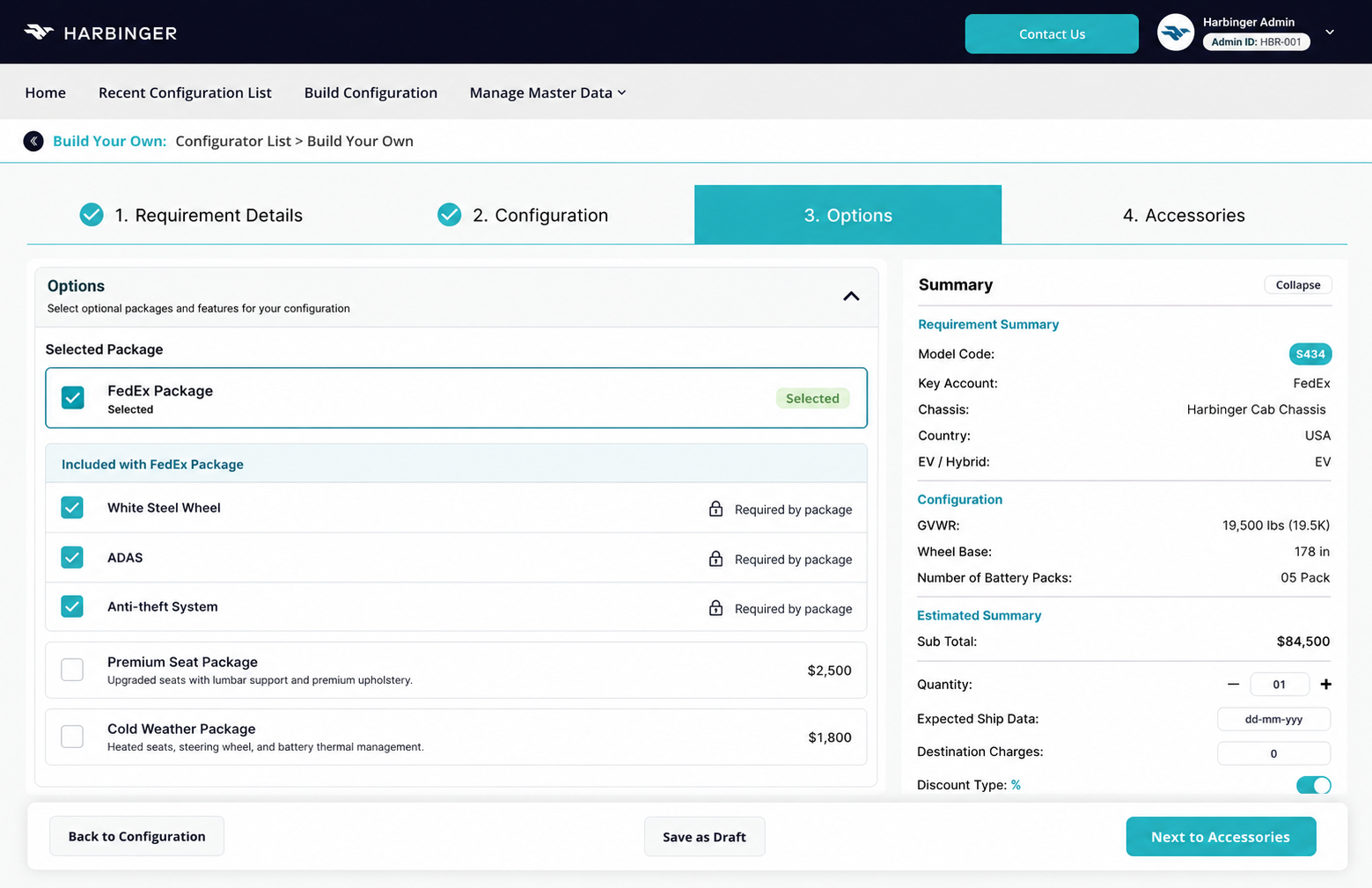
Later choices depend on earlier choices, so the interface has to validate the full configuration before it reaches quotation.
Earlier selections control every choice that follows.
- 01Chassis
- 02GVWR
- 03Wheelbase
- 04Battery
- 05Options
- 06Model code
- 07Price
Blocked path Incompatible options remain visible with their reason.
01020304Dependency-aware optionsPackage selection updates the choices that follow.
Disabled with a reasonRequired or incompatible items remain visible with their rule.
Persistent summaryThe selected configuration stays visible while options change.
Model code and priceCommercial consequences are visible before quotation.
Chassis, GVWR, wheelbase, battery pack, options, model code and pricing could produce incompatible combinations.
Keep the product range visible, disable incompatible choices with a reason and revalidate later selections.
Invalid combinations are blocked before quotation and the selected configuration remains visible.
Fewer invalid configurations should reach quotation or Sales Order.
Rule walkthroughs covered dependency changes and revalidation. Production error-rate measurement was not available.
User story · workflow · trade-offsView supporting evidence
As a sales or admin user, I need valid downstream choices and a persistent summary so I can create a quotation-ready vehicle without losing configuration context.
- Every downstream choice is checked against earlier selections.
- Incompatible options remain visible and explain the blocking dependency.
- Changing an earlier selection revalidates model code, options and price.
- The selected configuration remains visible through quotation and Sales Order creation.
Reconstructed retrospectively from delivered workflows and implementation knowledge.How dependency rules became visible before quotation- Sketch
- Wireframe
- Final UI
+
The map located the point where invalid combinations needed to be stopped.

- 1Choose chassis
- 2Choose independent options
- 3Build an invalid combination
- 4Discover conflict during quotation
- 1Choose chassis
- 2See valid downstream choices
- 3Read the blocking reason
- 4Continue with a quotation-ready setup
Dependency order and summary position.
Disabled choices keep the product range visible.
Model code, price and configuration stay in view.
Disable and explain incompatible choices while keeping the configuration summary visible.
Users can understand the available product range and the rule affecting each option.
Supported product combinations and pricing rules remained fixed business logic.
The screen carries more guidance and state detail than a hide-only approach.
VIN-based vehicle operations
Making the next responsible dealer visible at every stage
A New Delivery transfers responsibility for an existing vehicle between two dealers while the VIN remains the shared record.
Creates request
Accepts and sends In Transit
Completes PDI and delivery
The VIN stays constant while ownership moves.
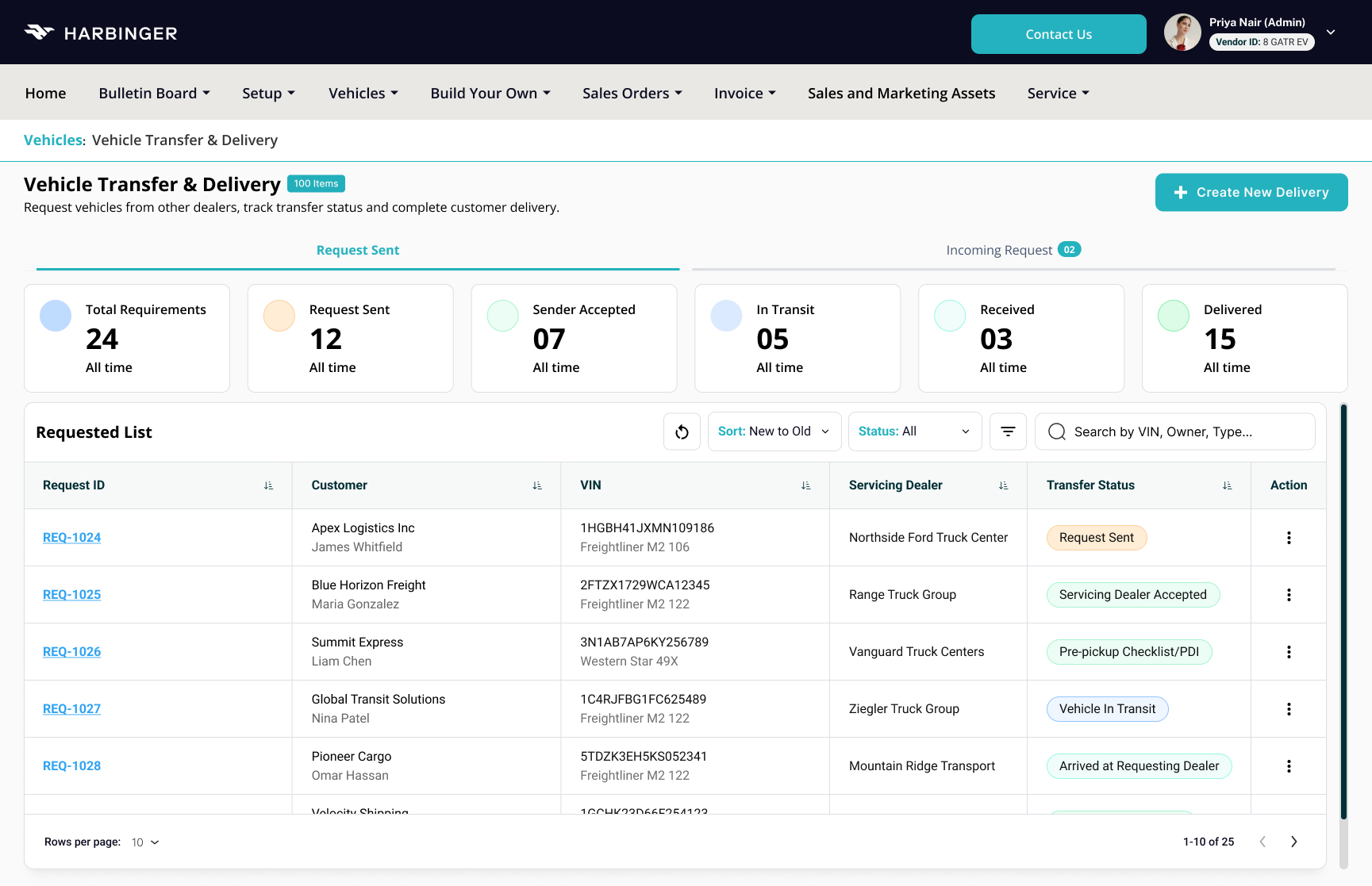
01020304Current statusThe transfer state remains available for quick scanning.
Completed stageProgress cards and status labels show how far the request has moved.
Responsible dealerDealer responsibility is visible beside the vehicle record.
Next actionThe action control opens the task required for that request.
A combined status showed progress but left the responsible dealer and next action unclear.
Separate current status, completed stage, responsible dealer and next action.
Each dealer can see their responsibility and the next required action.
Users should spend less time inferring ownership from status alone.
Both dealer perspectives were reviewed across approved stages. Task-time and hand-off metrics were not collected.
User story · workflow · trade-offsView supporting evidence
As a requesting or supplying dealer, I need the current stage, responsible dealer and next action so I know whether a delivery request is waiting on me.
Creates the request using an existing VIN
Accepts, prepares and marks the vehicle In Transit
Records arrival, completes PDI, warranty registration and retail delivery
- New Delivery uses an existing VIN.
- No new vehicle record is created.
- VIN comes from the existing vehicle table or system data.
- Requesting and Supplying Dealers have different responsibilities.
Reconstructed retrospectively from delivered workflows and implementation knowledge.How status became an ownership model- Sketch
- Wireframe
- Final UI
+
The role-labelled flow showed where responsibility changes and what each dealer needs next.

- Raise request
- Track transfer
- Record arrival
- Complete PDI and delivery
- Review request
- Accept or reject
- Prepare vehicle
- Mark In Transit
- Existing VIN
- One transfer record
- Stage history
- Warranty dependency
- 1Read combined status
- 2Open request
- 3Inspect history
- 4Infer owner
- 1Scan status
- 2See completed stage
- 3See responsible dealer
- 4Read next action
View more screens
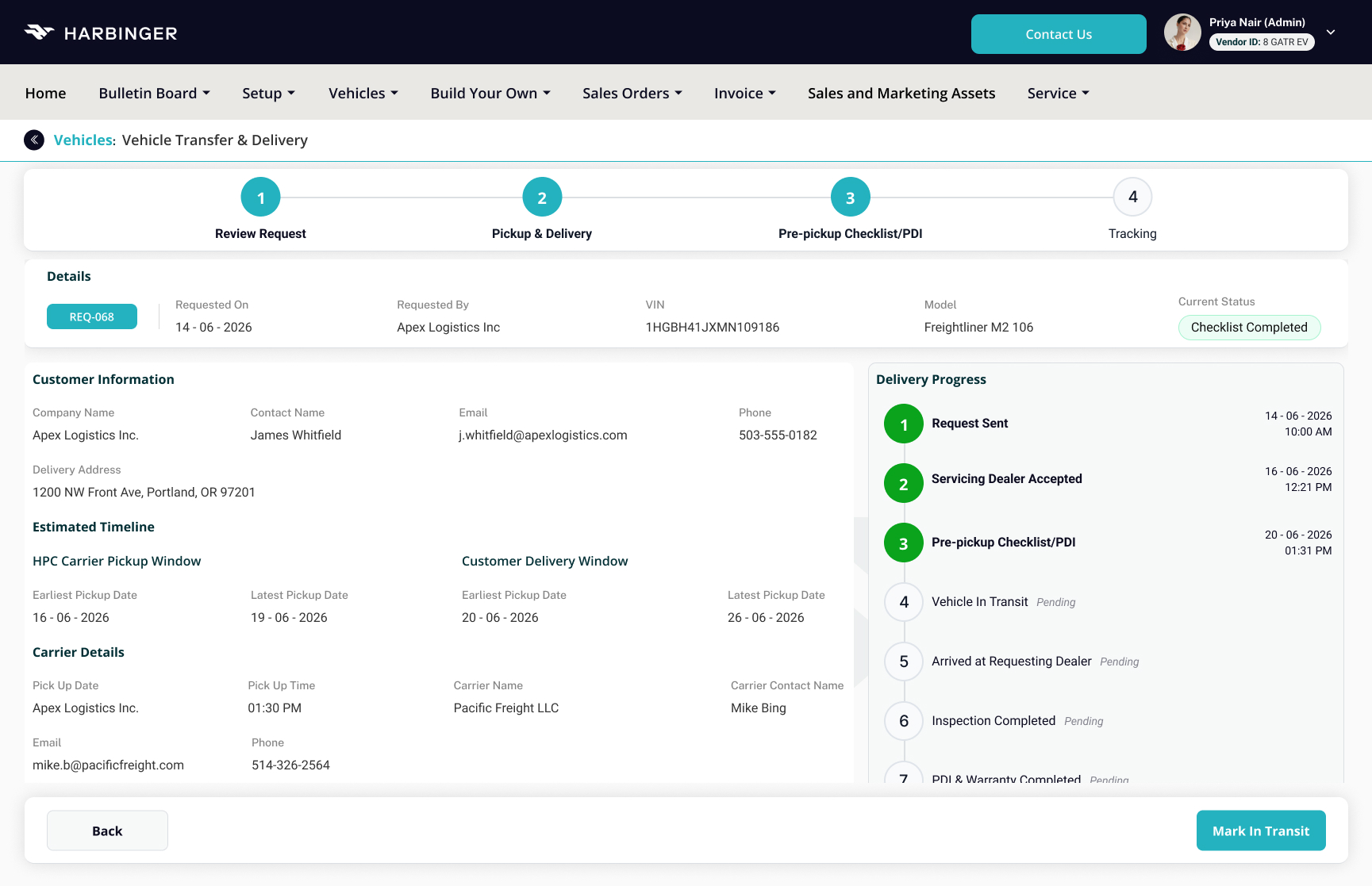
Show status, completed stage, responsible dealer and next action as separate signals.
Each signal answers a different operational question during a dealer hand-off.
Approved transfer stages and dealer responsibilities remained unchanged.
The list uses more columns, so information density is intentionally higher.
PDI and JSON-driven forms
Reducing checklist effort and requirement-
The checklist covered eight inspection areas while labels, fields, validation, options and ordering continued to change.
JSON controls shared form behaviour.
- Labels
- Field types
- Required states
- Validation
- Options
- Ordering
- Conditional visibility
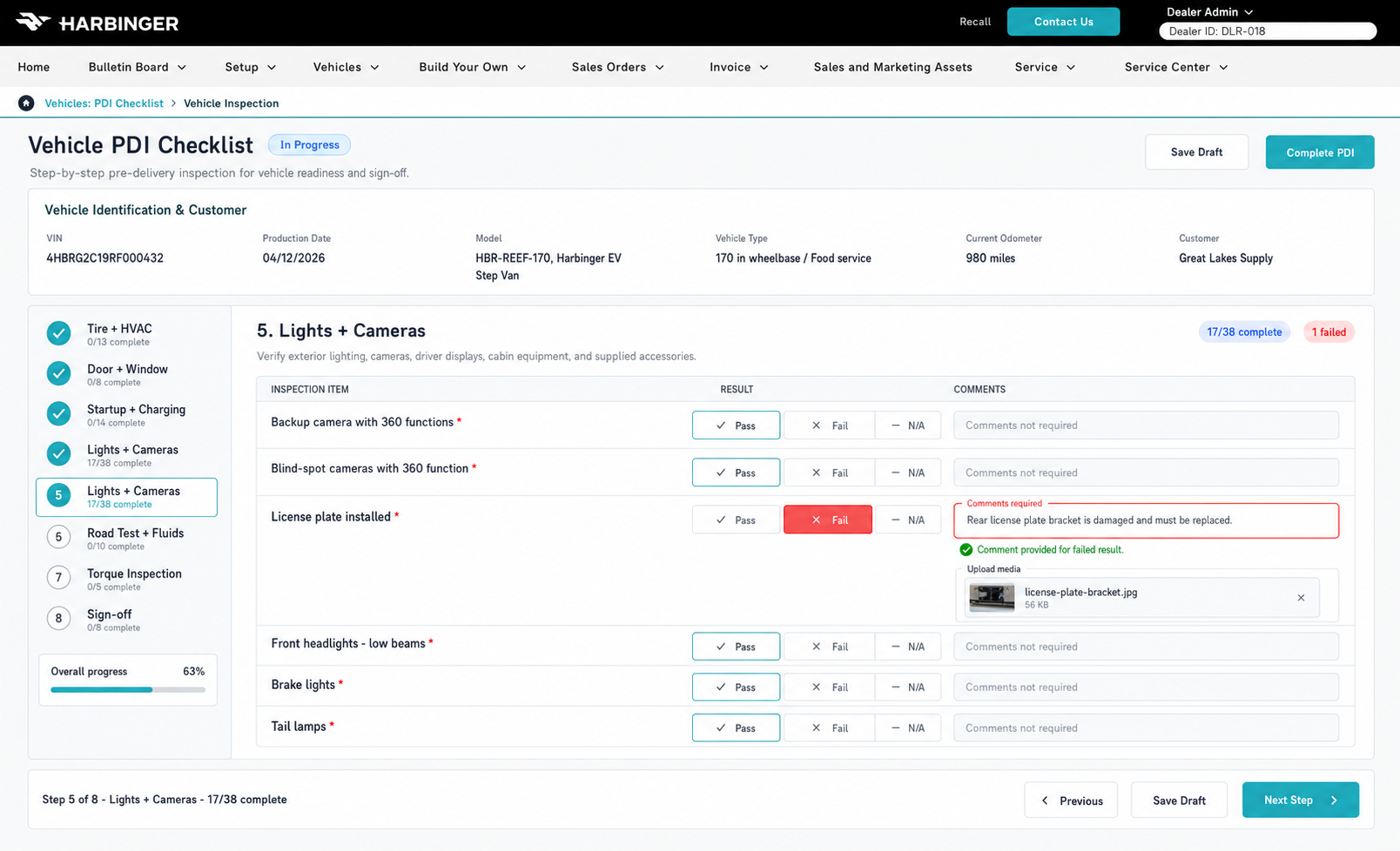
0102030405Eight task-based stepsThe checklist is grouped around recognizable inspection work.
Draft and resumeProgress and Save Draft preserve incomplete inspections.
Failed-item evidenceA failed result requires issue details and configured evidence.
Review before submissionCompletion moves the technician to sign-off and final review.
Warranty remains gatedWarranty registration stays unavailable until PDI passes.
A long checklist increased scanning effort and hardcoded fields created repeated UI and development changes.
Use eight task-based steps and move shared form behaviour into JSON configuration.
The form structure is separated from the screen layout and common field behaviour can be governed through configuration.
Requirement changes should need less repeated UI and development work.
Form, role, failed-item and resubmission scenarios were reviewed. Completion-time and maintenance-effort improvements were not formally measured.
User story · workflow · trade-offsView supporting evidence
As a dealer technician, I need to save progress, record failed items with evidence and resume the inspection so the vehicle can reach PDI approval without losing work.
- Labels
- Field types
- Required states
- Validation
- Options
- Ordering
- Conditional visibility
Reconstructed retrospectively from delivered workflows and implementation knowledge.How the checklist became a configurable form system- Sketch
- Wireframe
- Final UI
+
The architecture separates changing field behaviour from the screen implementation.
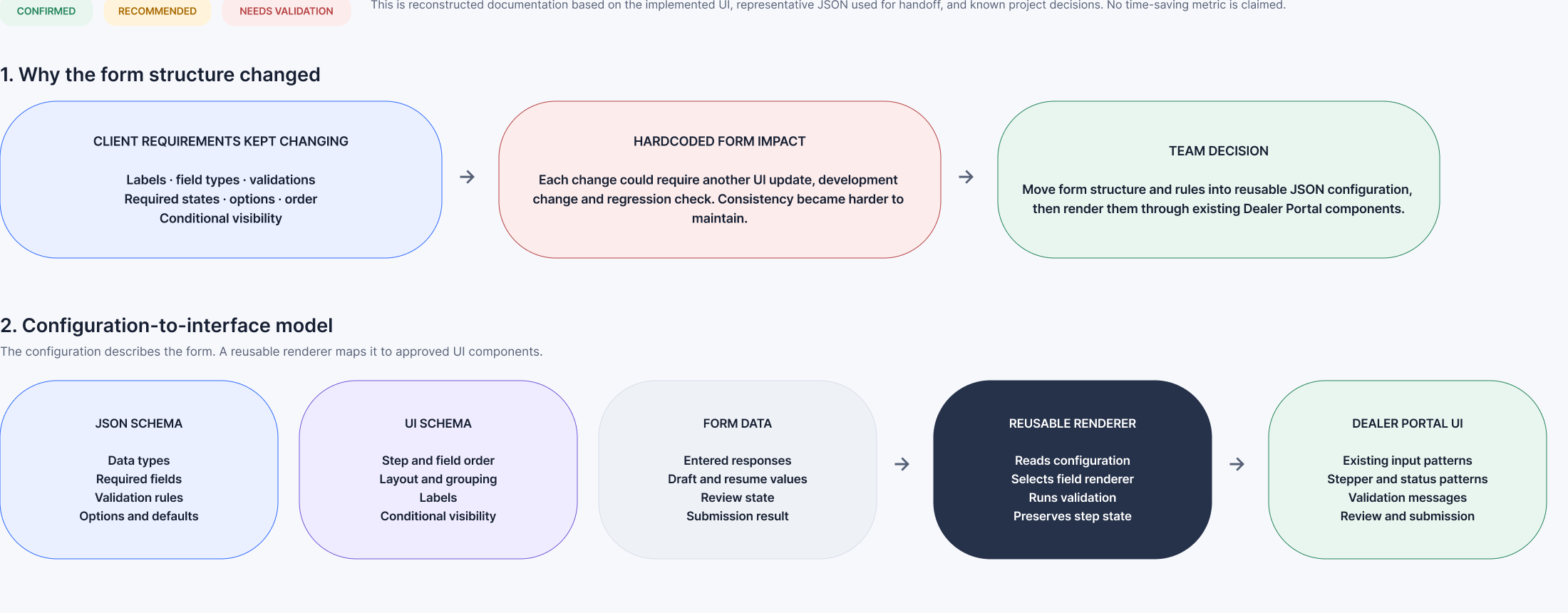
Long checklist and state requirements.
Eight task groups with draft progress.
Failed evidence and review before submission.
Restores work when the inspection resumes.
Captures the problem and supporting evidence.
Returns the inspection to the approval path.
Allows the vehicle lifecycle to continue.
View more screens
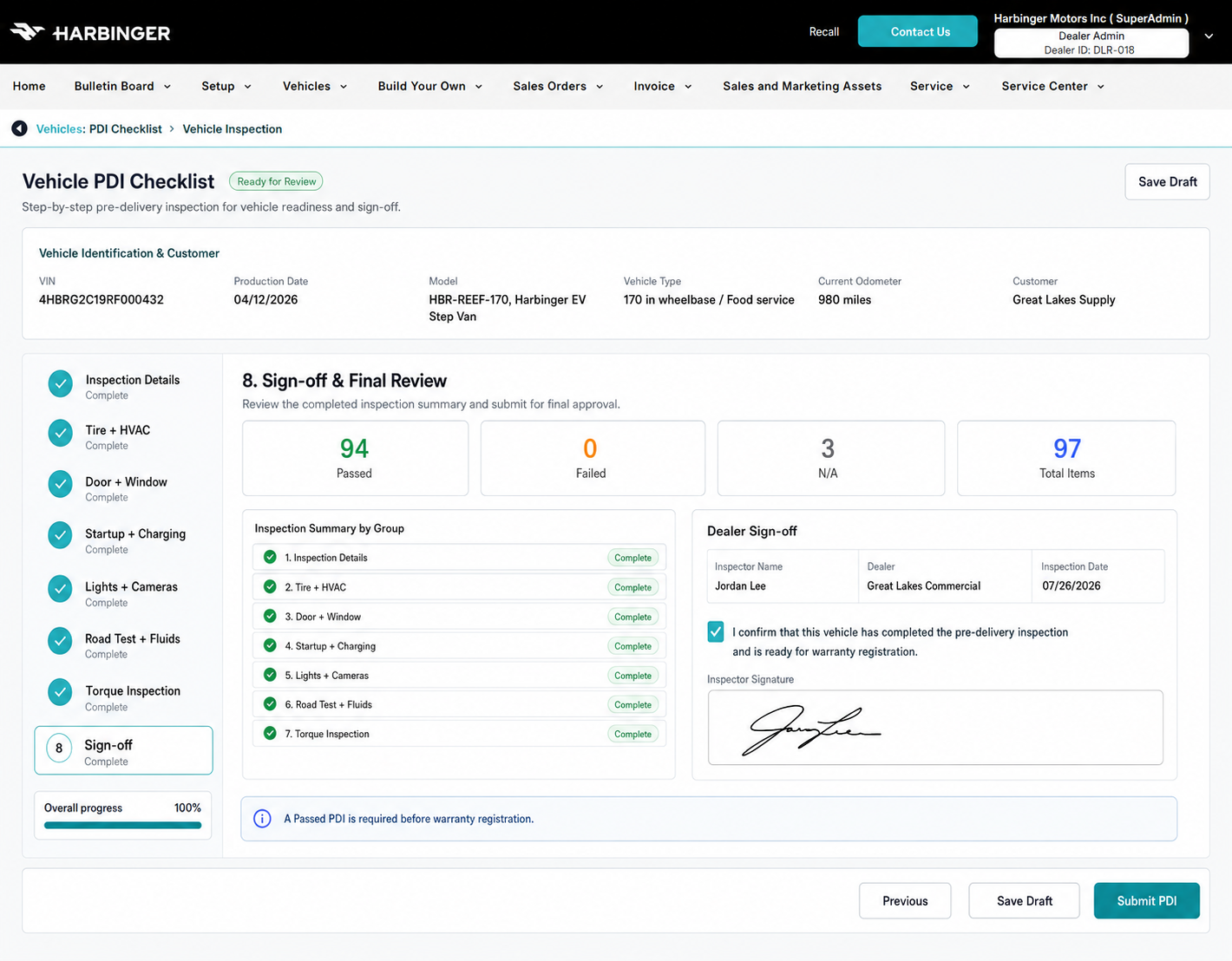
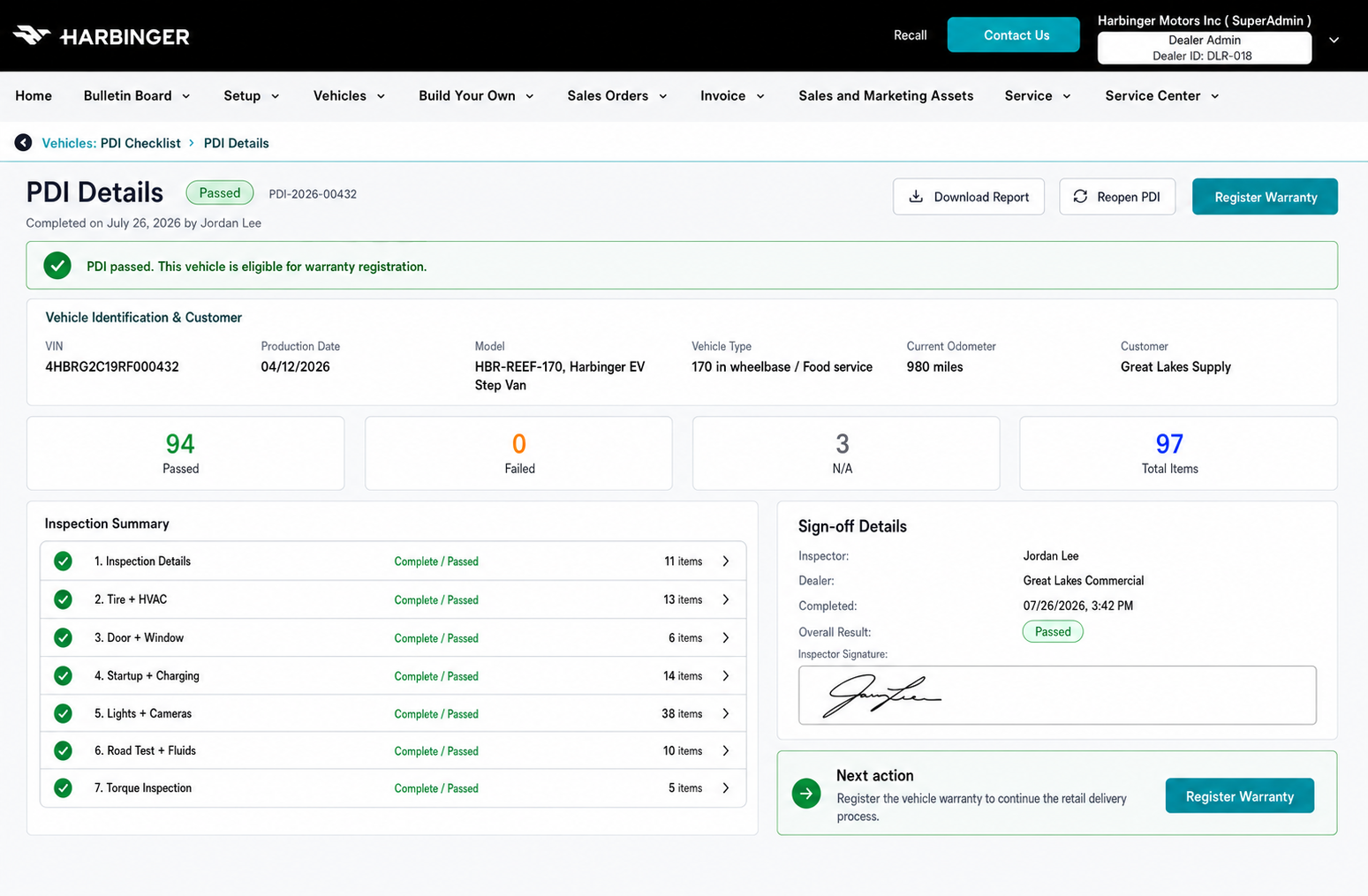
Use eight task-based steps and one renderer driven by JSON configuration.
Task grouping supports focused inspection while configuration governs shared field behaviour.
Inspection evidence and the approved vehicle lifecycle had to remain complete.
The renderer needs governance and unsupported behaviour still requires custom implementation.
Validation and UI QA
Checking the business rules beyond the final screens
Validation focused on rules, role ownership, implementation states and deployed UI review. Formal usability testing was outside the available evidence.
Could an invalid product combination still reach quotation?
Dependency rules, invalid combinations, model-code updates and quotation eligibility.
Could each dealer identify their next action?
Status, stage, responsible dealer and hand-off responsibility.
Could a failed PDI be submitted without evidence?
Failed-item rules, required issue details, draft recovery and resubmission.
The deployed VIN validation used the wrong source.
The screen treated the VIN as an unrelated manual value even though the valid VIN was already available in the vehicle table data. I reported the mismatch and asked the team to validate against the existing vehicle source.
A valid vehicle could be blocked at the start of New Delivery. The correction aligned the interface with the rule that delivery uses an existing VIN.
Delivered behaviour and reflection
Delivered behaviour and reflection
Invalid paths are blocked before quotation and the selected configuration remains visible.
Fewer invalid configurations should reach quotation or Sales Order.Status, stage, responsible dealer and next action are shown separately.
Dealers should spend less time inferring responsibility from progress alone.The checklist uses eight task-based steps and shared form behaviour is controlled through JSON configuration.
Changing fields and validation rules should require less repeated implementation work.Formal usability benchmarks, production error rates and maintenance-effort measurements were not available. The case study documents delivered interaction coverage, reviewed business rules and one confirmed implementation correction without inventing business impact.
I would define the product model, event tracking and success measures before high-fidelity design. This would create a clearer baseline for comparing each release with the previous workflow.
I now treat enterprise screens as connected decisions. Roles, business rules, data sources, states and ownership need to be clear before the interface can be considered complete.